Main Menu "Reports/Charts" Option
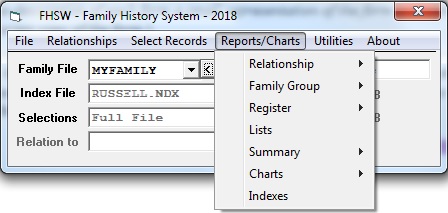
Relationship - produces Ancestor, Descendant or Relative reports, which are basically LISTs of each type of grouped records. The reports can be in "Fixed Format" with data presented in columns, or in "Free Format" with information presented in "paragraph" format.
Family Group - produces reports about individuals in a "Family Group" (that is: an individual, the parents, children, spouse(s) and spouse's parents). The reports may be printed as Blank data-gathering forms or as "filled in" forms, printed sequentially for selected individuals. They can also be printed in "free form", paragraph style.
Register - This is a style of report that is frequently used for Family Booklets. They can be for Ancestors, Descendants or Relatives (all descendants of all ancestors) and can include all types of information recorded in a family file.
Lists - These are similar in format to the "Relationship" reports, simple lists, but can include SELECTed records who may not be related. The reports can be in sorted sequence given by an INDEX file.
Summary - These reports do not provide detailed information about individuals but give counts or ranges of dates for records grouped in various ways. Types of Summary reports produced can be:
"Family File Summary" (about all records in a Family File);Charts - These are "graphical" reports which use lines to connect related individuals. For Ancestors these can be 4 or 5 generation page size charts, with filled and empty lines for all ancestors. You can also print an Ancestor MAP which shows all generations in a single chart, without entries for missing ancestors. Ancestors and Descendants can also be printed in "Box Style" charts with lines of relationship joining them. The "Relative Chart" is actually a printed table showing the number of relatives in each relationship category. The "Family Path" chart is a "box style" chart in which the connected boxes show the lines of relationship between two related individuals. Printing a "Family Path" chart or one of the "Horizontal Box" charts (a "box" chart with generations arranged in horizontal rows) requires using form FHSWNDWK to create a Node Reference File in which the box locations are recorded, prior to printing."Relationship" which provide reports of counters and date ranges for generations of Ancestors or Descendants, or a "Relationship Table" showing numbers of relatives by relationship type;
"Indexed" reports which provide summaries similar to those for groups of Ancestors or Descendants but with the groupings based upon the sequencing of records in a previously created Index File.
Indexes - This option provides for printing sorted indexes of references in one or more detail reports that have had entries created in a Reference Work File while being "printed". When this option is chosen form FORMRPIX will be shown to allow you to choose the appropriate INDEX file for the index. You may also choose a different Relationship work file for creating relationship labels in the index. From that form you can Continue with the printing which will pass control to the FHSWRPGM form.